
Real-Time Transaction Integrated with QuickBooks® Using RfP™ Invoicing
Send Instant Payment Requests via Mobile, Email, SMS, or QR Code

 To accelerate and simplify
business payments by integrating Real-Time Transaction
solutions with QuickBooks® Online, allowing merchants to
send alias-based Request for Payments (RfP™) via SMS,
email, and QR code with instant reconciliation and
settlement.
To accelerate and simplify
business payments by integrating Real-Time Transaction
solutions with QuickBooks® Online, allowing merchants to
send alias-based Request for Payments (RfP™) via SMS,
email, and QR code with instant reconciliation and
settlement.
TodayPayments.com empowers
businesses to get paid faster by combining Request for
Payment (RfP™) invoicing with Real-Time Transaction
processing and seamless QuickBooks® Online integration.
Our mobile-first, alias-enabled platform ensures
instant, secure payments and real-time cash flow.
Waiting days for invoice payments
is now a thing of the past. With Real-Time
Transaction integration through QBO QuickBooks®,
businesses can now send
Request for Payment (RfP™)
invoices directly to customers via Mobile Phone,
Email, Texting, SMS, or QR Code (QRC)—and get paid
in seconds.
Built on real-time payment rails
like FedNow® and RTP®, this system provides a
mobile-first, secure, and flexible solution that ensures
irrevocable good funds and instant reconciliation
inside QuickBooks® Online. It's the new standard for
instant invoicing and payment collection.
Real-Time Transactions powered
by Request for Payment (RfP™) give merchants a
seamless way to prompt customers for payment using
alias-based identifiers—email or mobile number—instead
of routing or account numbers. The payer receives a
secure, branded hosted payment page delivered
via:
- SMS
- Email
- Text message
- QR Code (QRC)
From there, they choose to pay via
FedNow®, RTP®, ACH, Card, or BNPL, with funds
settling instantly and syncing back to
QuickBooks® Online for real-time reconciliation.
See
the features
QuickBooks® ACH, Cards, FedNow and Real-Time Payments
- Payment processing for all QuickBooks desktop, Pro, Premier, Enterprise and also QBO QuickBooks Online Our software is designed for simplicity and ease-of-use.
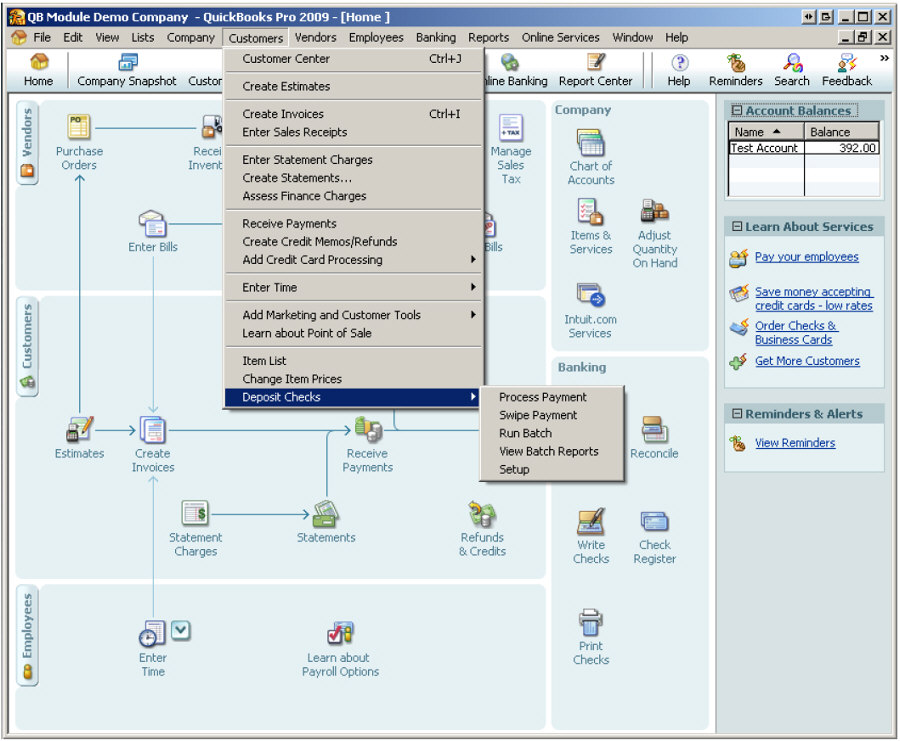
- ~ Automate Account Receivable Collection
- ~ Automate Account Payable Payments
- ~ One-time and Recurring Debits / Credits
Secure QB Plugin payment processing through QuickBooks ® specializes in the origination of moving money electronically.
Batch Processing, Recurring RfP™, and ISO 20022 Integration
Merchants can send one-time or recurring RfP™ invoices
using batch uploads formatted in:
- Excel (.xlsx)
- .XML
- JSON (ISO 20022)
This setup allows for scalable A2A, B2B, and C2B
payment flows across thousands of payers—while maintaining payment
certainty, audit traceability, and automated reconciliation into QBO.
✅ Request for Payments (RfP™)
Parameters, Attributes, Benefits & Features
Parameters
- Integration: QuickBooks® Online (QBO)
- Invoicing Channels: Mobile SMS, Email, QR
Code (QRC), Text Link
- Payer Identifier: Alias (Email, Mobile
Number, Token)
- Settlement Rails: RTP®, FedNow®, ACH, BNPL,
Card
- File Formats Supported: Excel, .XML, JSON
(ISO 20022)
- Transaction Types: A2A, B2B, C2B
- Destination Interface: Hosted Payment Page
Attributes
- Real-Time Settlement: Funds delivered
instantly and irrevocably
- Mobile-First Delivery: Payers receive
prompts via SMS, Email, or QR
- Alias-Based Security: No need for routing
or account numbers
- Recurring & One-Time Billing Support:
Subscription-ready
- ISO 20022 Compliance: Structured messaging
and audit trail
- Batch Upload Ready: High-volume invoicing
with minimal effort
- QuickBooks® Auto-Reconciliation: Seamless
AR management
- Payer Checkout Flexibility: Accepts
multiple rails for faster conversion
Ask us How:
- With Real-Time Transactions integrated into
QuickBooks® Online, businesses can instantly send RfP™ invoices via
SMS, email, or QR code, using alias-based identifiers for
security and convenience.
- Customers receive a mobile-friendly hosted
payment page, allowing them to pay via RTP®, FedNow®, ACH, card,
or BNPL, while the payment is automatically recorded in QBO.
- Using ISO 20022-compliant file formats such
as Excel, XML, or JSON, merchants can batch-send hundreds of RfP™
requests with detailed remittance metadata for audit and automation.
- Each payment request eliminates the need for bank
account or routing number entry, improving the customer experience and
reducing the risk of fraud.
- Merchants operating in retail, services,
subscription, or professional billing benefit from instant cash
flow and reduced DSO (Days Sales Outstanding) with every real-time
transaction.
- Integration with QuickBooks® Online means
that payment receipts, customer records, and invoice status are all
updated in real time, eliminating manual AR tasks.
- This system supports both one-time and
recurring invoices, making it ideal for everything from utility
bills and retainers to ecommerce and POS transactions.
Implementing Account-To-Account Real-Time Transactions for B2B (Business-to-Business) and C2B (Customer-to-Business) using a bank's dashboard and a biller/payee payment page as a catalyst from Request for Payment (RfP) using QuickBooks Online (QBO) and QuickBooks Enterprise can significantly enhance your payment processes. Here’s a tailored guide to help you integrate these capabilities:
Key Components
- Integration with QBO and QuickBooks
Enterprise:
- Use SecureQBPlugin.com to integrate RfP functionalities with both QuickBooks Online and QuickBooks Enterprise, ensuring seamless payment requests and receipts synchronization.
- Real-Time Payment Networks:
- Leverage RTP by The Clearing House and FedNow services for immediate transaction processing, providing real-time transaction capabilities.
- Bank's Dashboard and Payment Pages:
- Integrate with banks’ dashboards to allow payers to initiate payments directly.
- Provide payment pages on the biller/payee’s website for easy access to RfP links.
- Digital Invoicing:
- Generate digital invoices in QuickBooks with embedded RfP links for easy payments by customers and businesses.
- Automate the generation and sending of these invoices.
- Security and Compliance:
- Implement secure payment gateways to safeguard financial information.
- Ensure compliance with financial regulations and industry standards for account-to-account transactions.
Benefits
- Immediate Payment Confirmation:
- Receive instant payment confirmations, improving cash flow and reducing the risk of late payments.
- Real-time updates in QuickBooks ensure accurate financial records.
- Convenience and Flexibility:
- Provides a convenient and flexible payment method for both B2B and C2B transactions.
- Simplifies the payment process for customers and businesses, reducing friction and enhancing the overall experience.
- Enhanced Cash Flow Management:
- Facilitates better cash flow management through timely payments.
- Reduces the need for follow-ups on outstanding invoices.
- Incentive Programs:
- Introduce Real-Time Discounts, Loyalty Points, Bonuses, and Cash-back features to encourage timely payments.
- Use these incentives to build customer loyalty and drive repeat business.
Implementation Steps
- Select Integration Partner:
- Use SecureQBPlugin.com for integrating account-to-account real-time transaction solutions with QuickBooks and bank dashboards.
- Ensure the integration supports RTP and FedNow services.
- Configure QuickBooks:
- Set up QuickBooks to accommodate account-to-account transaction functionalities.
- Ensure all necessary configurations and settings are in place.
- Implement Payment Processors and Bank
Integration:
- Integrate SecureQBPlugin.com’s platform with banks’ dashboards and payment pages.
- Ensure the platform can handle real-time account-to-account transactions and is compatible with QuickBooks.
- Develop Digital Invoices:
- Customize invoice templates in QuickBooks to include RfP links.
- Automate the generation and sending of these invoices.
- Ensure Security and Compliance:
- Use secure gateways to handle account-to-account payments and protect customer data.
- Maintain compliance with financial regulations and industry standards.
- Train Staff and Educate Customers:
- Provide training to staff on the new system and how to handle account-to-account payments.
- Educate customers and business partners about the benefits and process of using RfP for real-time transactions.
- Monitor and Optimize:
- Continuously monitor the system for performance and potential issues.
- Optimize processes based on feedback and performance metrics.
Detailed Integration Steps
- Integration Setup:
- Work with SecureQBPlugin.com to establish the integration between their real-time payment solution and QuickBooks, banks’ dashboards, and payment pages.
- Ensure that the integration supports RTP and FedNow for real-time transactions.
- Payment Processor Integration:
- Implement and configure SecureQBPlugin.com’s platform to handle account-to-account real-time payments.
- Test the integration to ensure smooth and efficient transaction processing.
- Digital Invoice Configuration:
- Design digital invoices in QuickBooks that include RfP links for account-to-account transactions.
- Automate the generation and sending of these invoices.
- Security Implementation:
- Utilize secure gateways for processing account-to-account payments and protecting customer data.
- Ensure all security measures comply with industry standards and regulations.
- System Testing:
- Conduct thorough testing to ensure the system works seamlessly.
- Test various scenarios to identify and resolve any potential issues.
- Launch and Continuous Monitoring:
- Go live with the integrated system.
- Regularly monitor transactions and system performance to ensure smooth operation.
Example Workflow
- Invoice Generation:
- A digital invoice is generated in QuickBooks with an embedded RfP link suitable for account-to-account transactions.
- Invoice Delivery:
- The invoice link is sent to the payer via email or another digital channel.
- The payer accesses the link through their bank’s dashboard or the biller/payee’s payment page.
- Payment Request:
- The payer clicks the RfP link and initiates the payment via their bank’s dashboard or the biller/payee’s payment page.
- Real-Time Payment Processing:
- The payment is processed in real-time through RTP or FedNow, and confirmation is sent to the biller/payee.
- Automatic Reconciliation:
- The payment is automatically recorded and reconciled in QuickBooks.
By implementing this real-time account-to-account transaction solution using SecureQBPlugin.com, you can significantly enhance your payment processes, improve cash flow, and provide a better customer experience through QuickBooks Enterprise and QuickBooks Online. This integration ensures that you leverage the benefits of real-time payments effectively, catering to the needs of both B2B and C2B transactions.
Ditch delays. Get paid in real time.
With TodayPayments.com, you can send Request for Payment (RfP™)
invoices via SMS, email, or QR code—and collect real-time good
funds integrated directly into QuickBooks® Online.
✅ Alias-based invoicing—no bank info needed
✅
Accept payments via RTP®, FedNow®, ACH, or Card
✅ Send RfP™ instantly via
mobile, email, or QRC
✅ Batch upload invoices using ISO 20022
✅
Auto-reconcile all payments with QuickBooks®
✅ Improve cash flow, reduce
AR, and modernize billing
👉 Visit
https://www.TodayPayments.com
Start sending real-time payment
requests integrated with QBO now.
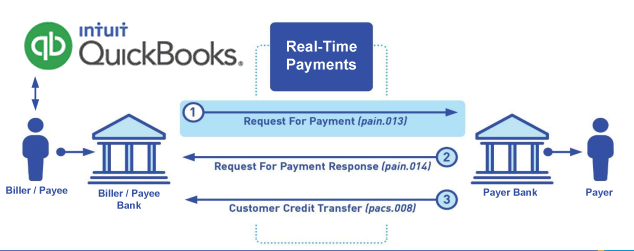
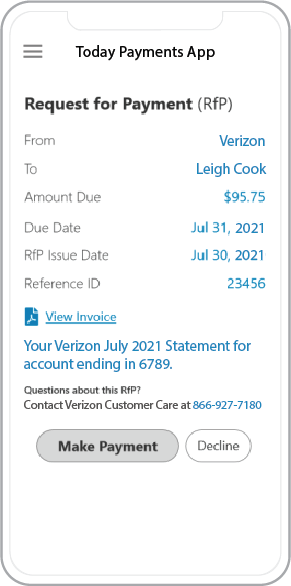 Call us, the .csv, text messaging and or .xml Request for Payment (RfP) file you need while on your 1st phone call! We guarantee our reports work to your Bank and Credit Union. We were years ahead of competitors recognizing the benefits of RequestForPayment.com. We are not a Bank. Our function as a role as an "Accounting System" in Open Banking with Real-Time Payments to work with Billers to create the Request for Payment to upload the Biller's Bank online platform. U.S. Companies need help to learn the RfP message delivering their bank. Today Payments' ISO 20022 Payment Initiation (PAIN .013) show how to implement Create Real-Time Payments Request for Payment File up front delivering message from the Creditor (Payee) to it's bank. Most banks (FIs) will deliver the message Import and Batch files for their company depositors for both FedNow and Real-Time Payments (RtP). Once uploaded correctly, the Creditor's (Payee's) bank continuing through a "Payment Hub", will be the RtP Hub will be The Clearing House, with messaging to the Debtor's (Payer's) bank.
Our in-house QuickBooks payments experts are standing ready to help you make an informed decision to move your company's payment processing forward.
Pricing with our Request For Payment Professionals
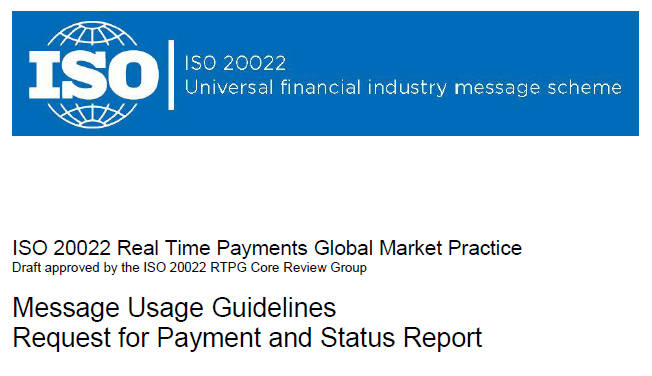
1) Free ISO 20022 Request for Payment File Formats, for FedNow and Real-Time Payments (The Clearing House) .pdf for you manually create "Mandatory" (Mandatory data for completed file) fields, start at page 4, with "yellow" highlighting. $0.0 + No Support
2) We create .csv or .xml formatting using your Bank or Credit Union. Using your invoice information database to create an existing Accounts Receivable file, we CLEAN, FORMAT to FEDNOW or Real-Time Payments into CSV or XML. Create Multiple Templates. You can upload or "key data" into our software for File Creation of "Mandatory" general file. Use either the Routing Number and Account Number for your Customers or use "Alias" name via Mobile Cell Phone and / or Email address.
Fees = $57 monthly, including Activation, Support Fees and Batch Fee, Monthly Fee, User Fee. We add your URI for each separate Payer transaction for additional Payment Methods on "Hosted Payment Page" (Request for file with an HTML link per transaction to "Hosted Payment Page" with ancillary payment methods of FedNow, RTP, ACH, Cards and many more!) + $.03 per Transaction + 1.5% percentage on gross dollar file,
3) Add integrating QuickBooks Online "QBO" using FedNow Real-time Payment using our Real-Time Transaction system.
Fees Above 2) plus $29 monthly additional QuickBooks Online "QBO" formatting, and "Hosted Payment Page" and WYSIWYG
4) Above 3) plus Create "Total" (over 600 Mandatory, Conditional & Optional fields of all ISO 20022 Pain .013) Price on quote.
Start using our FedNow Real-Time Payments Bank Reconciliation:
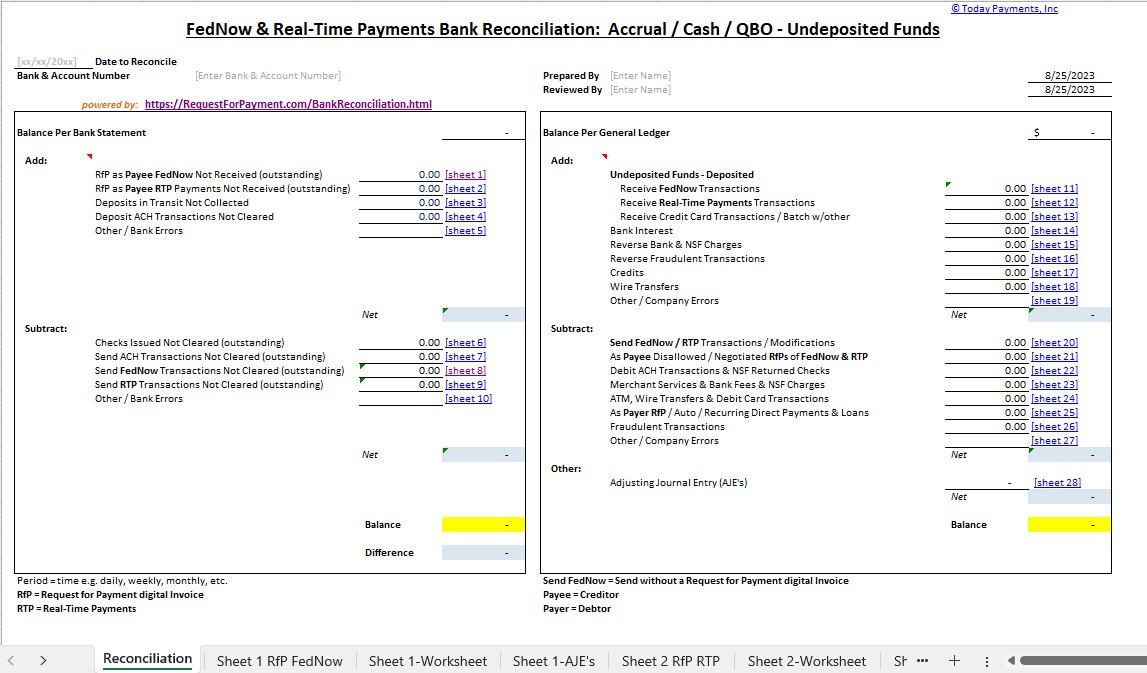
Dynamic integrated with FedNow & Real-Time Payments (RtP) Bank Reconciliation: Accrual / Cash / QBO - Undeposited Funds
Give Us A Call
(866) 927-7180